Friday, 1 March 2013

HOW TO CHECK DND(Do Not Disturb) SERVICE STATUS ONLINE IN INDIA


DND is short for Do Not Disturb. This service enables the mobile users to stop receiving advertising or bulk sms or calls on their mobile. This service is provided by NDNC (National Do Not Call Registry). So if you want to check your number is registered on DND or not then here are some steps , just follow them.

STEP 1.
First of all open this website, and click on Check Registration Status.


COLLECTION OF PROXY SITES FOR BROWSING BANNED SITES

Hey friends, hi to all of you. As there are many websites that are blocked in your school/college or even in your country. If you want to open those websites, you will
need to use a proxy website. A proxy is something that hides your real information and tells the server that you are allowed to view website. Here goes the list:

Hey friends, hi to all of you. As there are many websites that are blocked in your school/college or even in your country. If you want to open those websites, you will
need to use a proxy website. A proxy is something that hides your real information and tells the server that you are allowed to view website. Here goes the list:

Rest sites are given below:
How to use? Just enter the URL you want to open and hit Enter. It will open up the sites you want.
HAVE A TRICKY DAY!!!

Top 10 websites to download YouTube videos

Hi friends , you know that YouTube do not allow the users to download videos from it. But when user like the video and want to download it on its device then he try to find some softwares or websites to download YouTube videos so today I decided to help those users to download YouTube videos. I have made a simple collection of Top 10 websites to download YouTube videos, So have a look at them , I hope this list will be useful for you and you'll like this.


1. Keep-Tube.Com


2. Savevid.com


3. Savemedia.com


4. Keepvid.com


5. Videodownloadx.com


6. Catchvideo.net


7. Savetube.com


8. Linkyoutube.com


9. Youtubeinmp4.com


10. Clipconverter.cc


[NOTE:- You can use these website to download YouTube videos only from PC browser, because Mobile browsers like OperaMini , UC web do not have Java inbuilt so you can not download YouTube video from mobile using these websites]

" ENJOY & WAIT FOR NEXT "

HOW TO POST TWITTER UPDATE AUTOMATICALLY ON FACEBOOK

Hey friends, hi to all of you. Facebook is the first thing you think when it comes to social networking. But, lots of people use Twitter too. We have a idea : Why not post your twitter updates
directly on your Facebook wall? That`s cool ! Right....Here`s how you can do it:

  • Login to your Twitter account. 
  • Now, scroll down and click Connect to Facebook
  • A pop up will come up, login with your Facebook and click on Allow
  • It is done. Now, whenever you post from twitter, it is posted to Facebook too.

Thursday, 28 February 2013

upadte facebook status in blue colour

Hello, friends today I have one more working trick for facebook. I'll tell you how to upadte facebook status in blue colour. This trick is not so much leanthy as you are thing right now, but you have to follow some steps to procced with this trick


STEP 1. Open your facebook account


STEP 2. Now copy this code and replace the red colour lines with your status


@[1: ]@@[1:[0:1: mohithack99.blogspot.in/]]


STEP 3. That's it, You have done , You status has been updated in blue colour

Tuesday, 1 January 2013

What is Visual Basic?

1.2 What is Visual Basic?
VISUAL BASIC is a high level programming language which  evolved from the earlier DOS version called BASIC. BASIC means Beginners' All-purpose Symbolic Instruction Code. It is a very  easy programming language to learn. The code look a lot  like English Language. Different software companies produced different versions of BASIC, such as Microsoft QBASIC, QUICKBASIC, GWBASIC ,IBM BASICA and so on. However, people prefer to use Microsoft Visual Basic today, as it is a well developed programming language and supporting resources are available everywhere. Now, there are many versions of VB exist in the market, the most popular one and still widely used by many VB programmers is none other than Visual Basic 6. We also have VB.net, VB2005, VB2008 and the latest VB2010. Both Vb2008 and VB2010 are fully object oriented programming (OOP) language.
VISUAL BASIC is a VISUAL and  events driven Programming Language. These are the main divergence from the old BASIC. In BASIC, programming is done in a text-only environment and the program is executed sequentially. In VB, programming is done in a graphical environment. In the old BASIC, you have to write program code for each graphical object you wish to display it on screen, including its position and its color. However, In VB , you just need to drag and drop any graphical object anywhere on the form, and you can change its color any time using the properties windows.
On the other hand, because  the user may click on a certain object randomly, so each object has to be programmed independently to be able to response to those actions (events). Therefore, a VB Program is made up of many subprograms, each has its own program code, and each can be executed independently and at the same time each can be linked together in one way or another.
1.3 What programs can you create with Visual Basic 6?
With VB 6, you can create any program depending on your objective. For example, if you are a college or university lecturer,  you can create  educational programs to teach business, economics, engineering, computer science, accountancy , financial management, information system and more to make teaching more effective and interesting. If you are in business, you can also create business programs such as inventory management system , point-of-sale system, payroll system, financial program as well as accounting program to help manage your business and increase productivity. For those of you who like games and working as games programmer, you can create those programs as well. Indeed, there is no limit to what program you can create ! There are many such programs in this tutorial, so you must spend more time on the tutorial in order to learn how to create those programs.
1.4 The Visual Basic 6 Integrated Development Environment
Before you can program in VB 6, you need to install Visual Basic 6 in your computer.
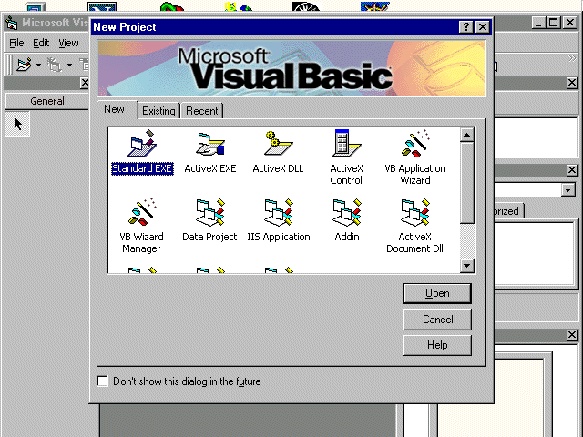
   On start up, Visual Basic 6.0  will display the following dialog box as shown in figure 1.1. You can choose to either start a new project, open an existing project or select a list of recently opened programs. A project is a collection of files that make up your application. There are various types of applications that we could create, however, we shall concentrate on creating Standard EXE programs (EXE means executable program). Now, click on the Standard EXE icon to go into the actual Visual Basic 6 programming environment.
 

  Bookmark and Share

Thursday, 13 December 2012

how to make child doman

To create a new child domain follow this procedure
  • Click Start, click Run, and then type dcpromo to start the Active Directory Installation Wizard.
  • On the Operating System Compatibility page, read the information and then click Next.
If this is the first time you have installed Active Directory on a server running Windows Server 2003, click Compatibility Help for more information.
  • On the Domain Controller Type page, click Domain controller for a new domain, and then click Next.
  • On the Create New Domain page, click Child domain in an existing domain tree, and then click Next.
  • On the Network Credentials page, type the user name, password, and user domain of the user account you want to use for this operation, and then click Next.
The user account must be a member of the Enterprise Admins group.
  • On the Child Domain Installation page, verify the parent domain and type the new child domain name, and then click Next.
  • On the NetBIOS Domain Name page, verify the NetBIOS name, and click Next.
  • On the Database and Log Folders page, type the location in which you want to install the database and log folders, or click Browse to choose a location, and then click Next.
  • On the Shared System Volume page, type the location in which you want to install the Sysvol folder, or click Browse to choose a location, and then click Next.
  • On the DNS Registration Diagnostics page, verify the DNS configuration settings are accurate, and then click Next.
  • On the Permissions page, select one of the following:
• Permissions compatible with pre-Windows 2000 server operating systems
• Permissions compatible only with Windows 2000 or Windows Server 2003 operating systems
  • On the Directory Services Restore Mode Administrator Password page, type and confirm the password that you want to assign to the Administrator account for this server, and then click Next.
  • Use this password when starting the computer in Directory Services Restore Mode.
  • Review the Summary page, and then click Next to begin the installation.
  • Restart your Server.